 Home & travel planner

Plan meals, chores, home care, a move and trips for your whole household in one place.
Hearth is a household planner that runs in your browser. Describe your household once — people, pantry, chores, home features, rooms, a move and your trips — and Hearth turns it into runs of seventeen usefulweb tools: a fridge check, recipe ideas and a weekly dinner plan with shopping list, fair chore rotations, a maintenance calendar and emergency kit, moving scenarios, furniture fit checks and room layouts, jet lag plans, connection odds, payment fees and a movie night. A dashboard, a two-week agenda, one calendar file with reminders, snapshots over time and a printable report bring it all together.
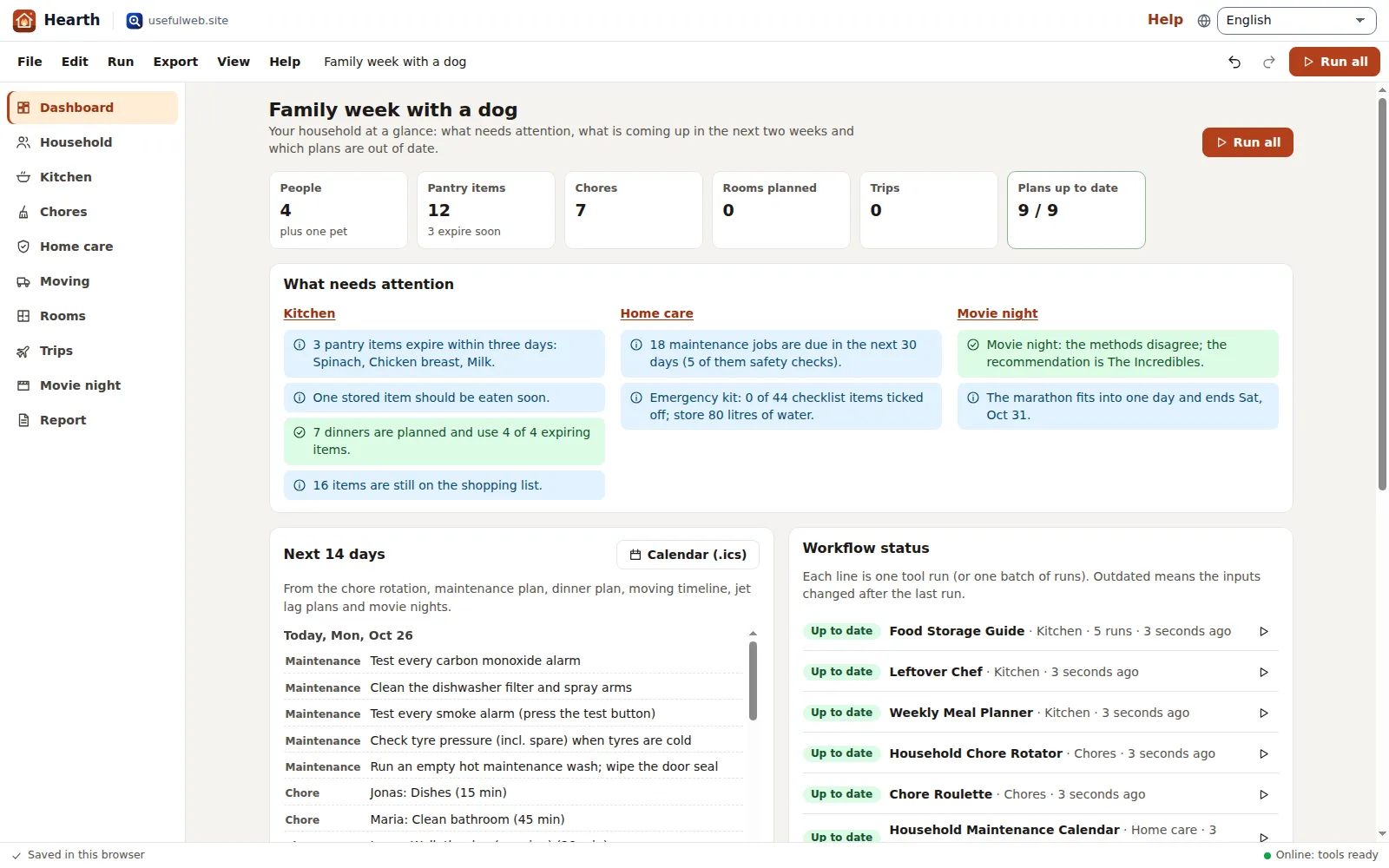
Screenshots
- Dashboard: findings, agenda and workflow status
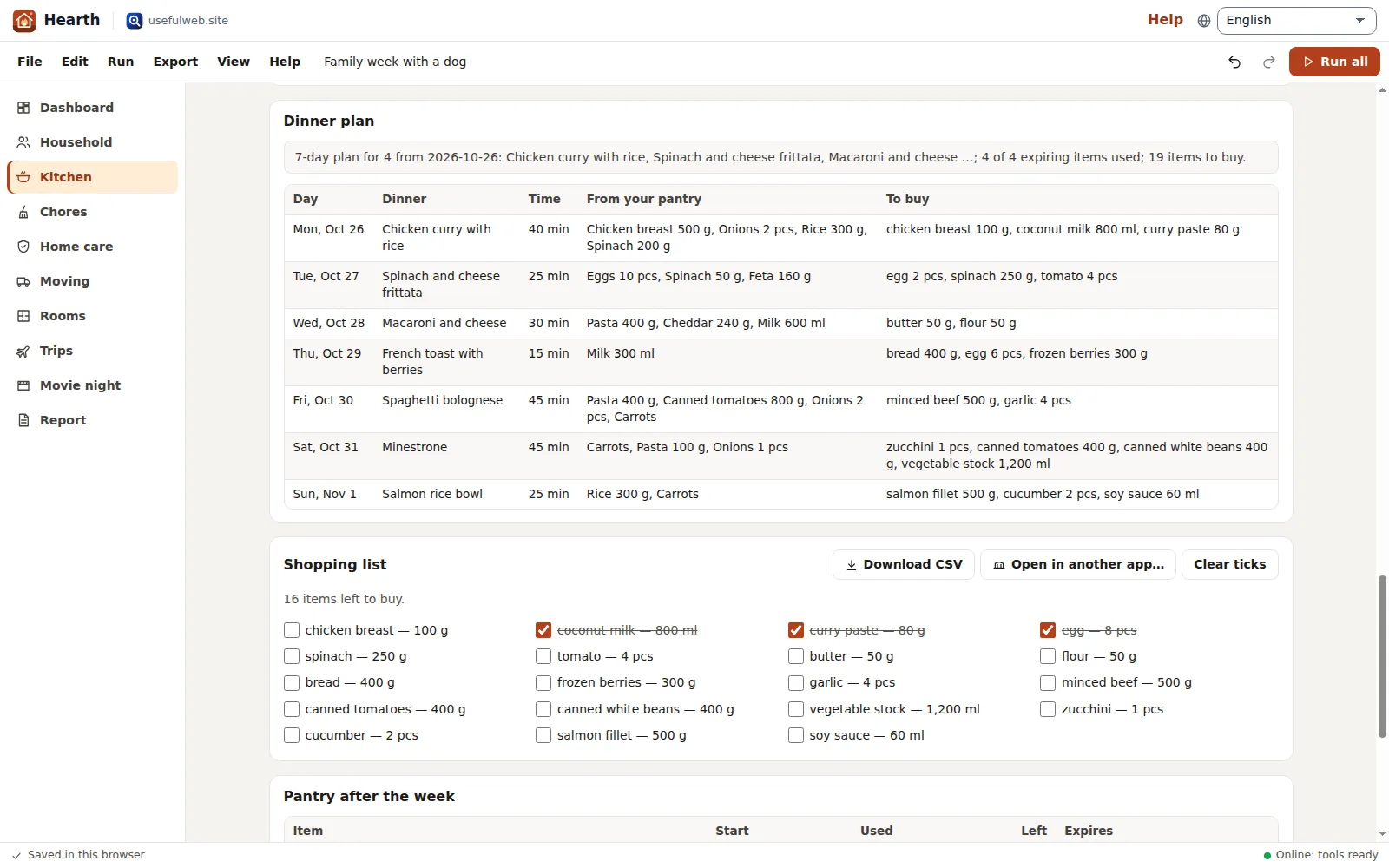 From the fridge to the shopping list
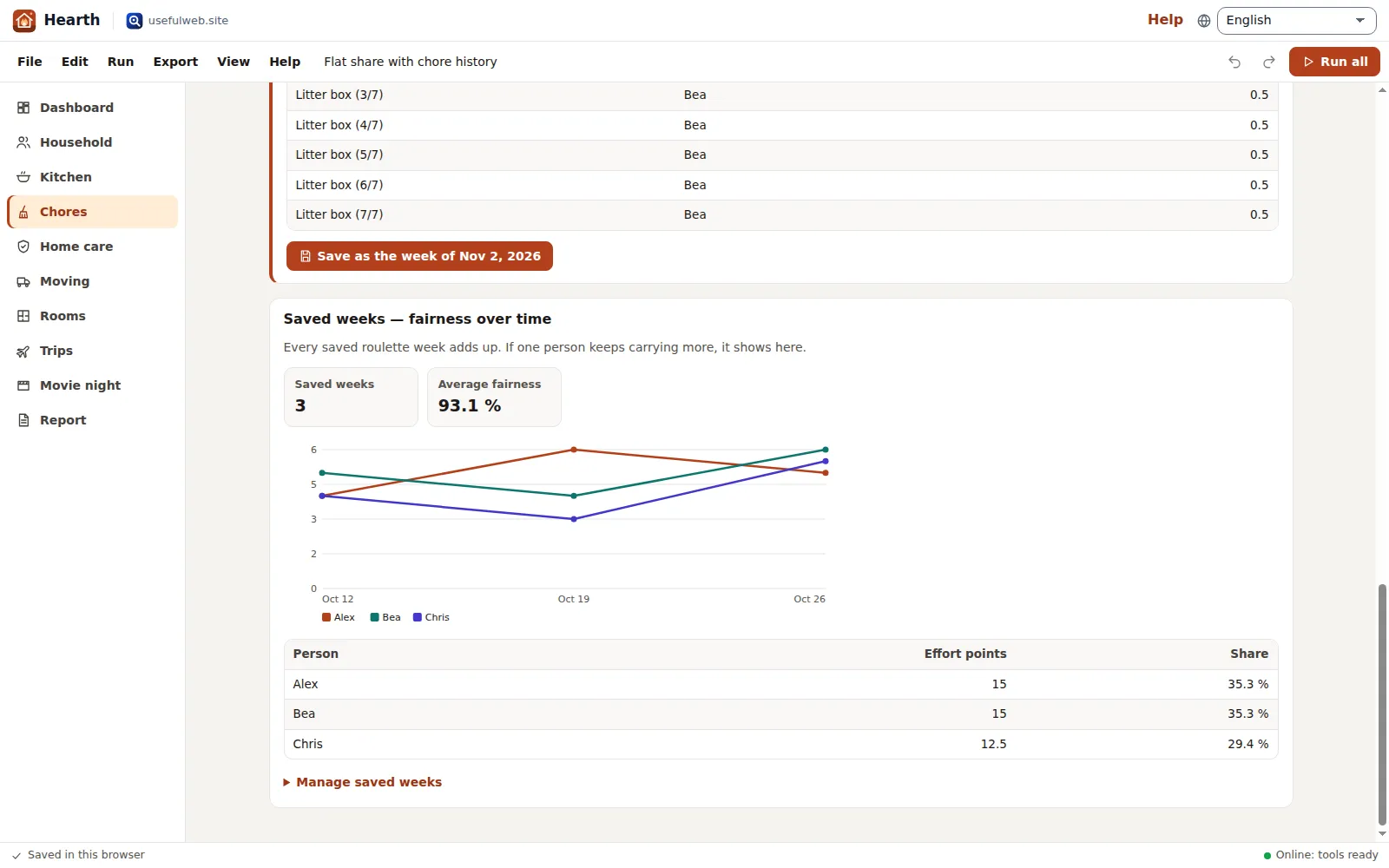 Fair chores over time
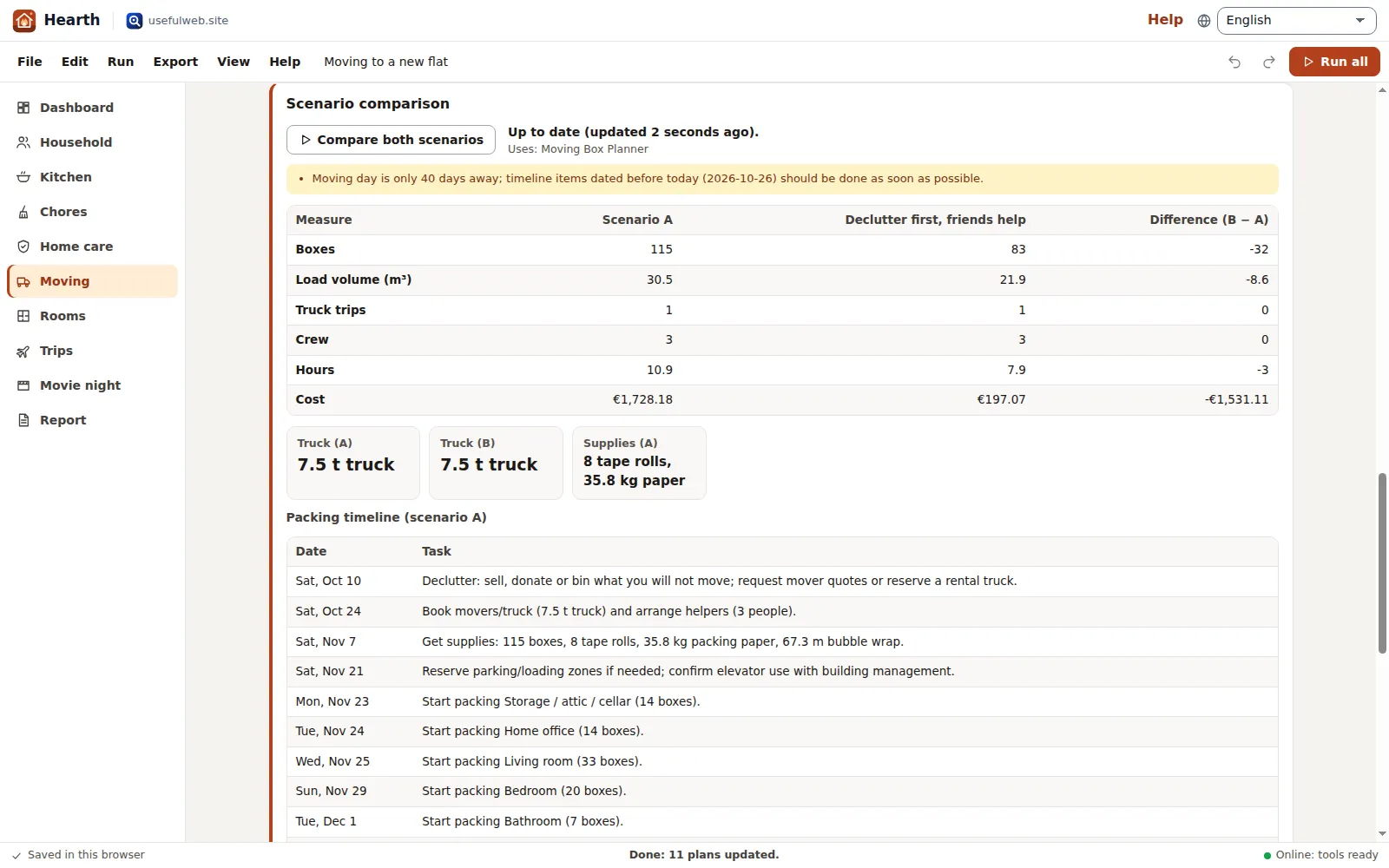 Moving scenarios and the furniture fit check
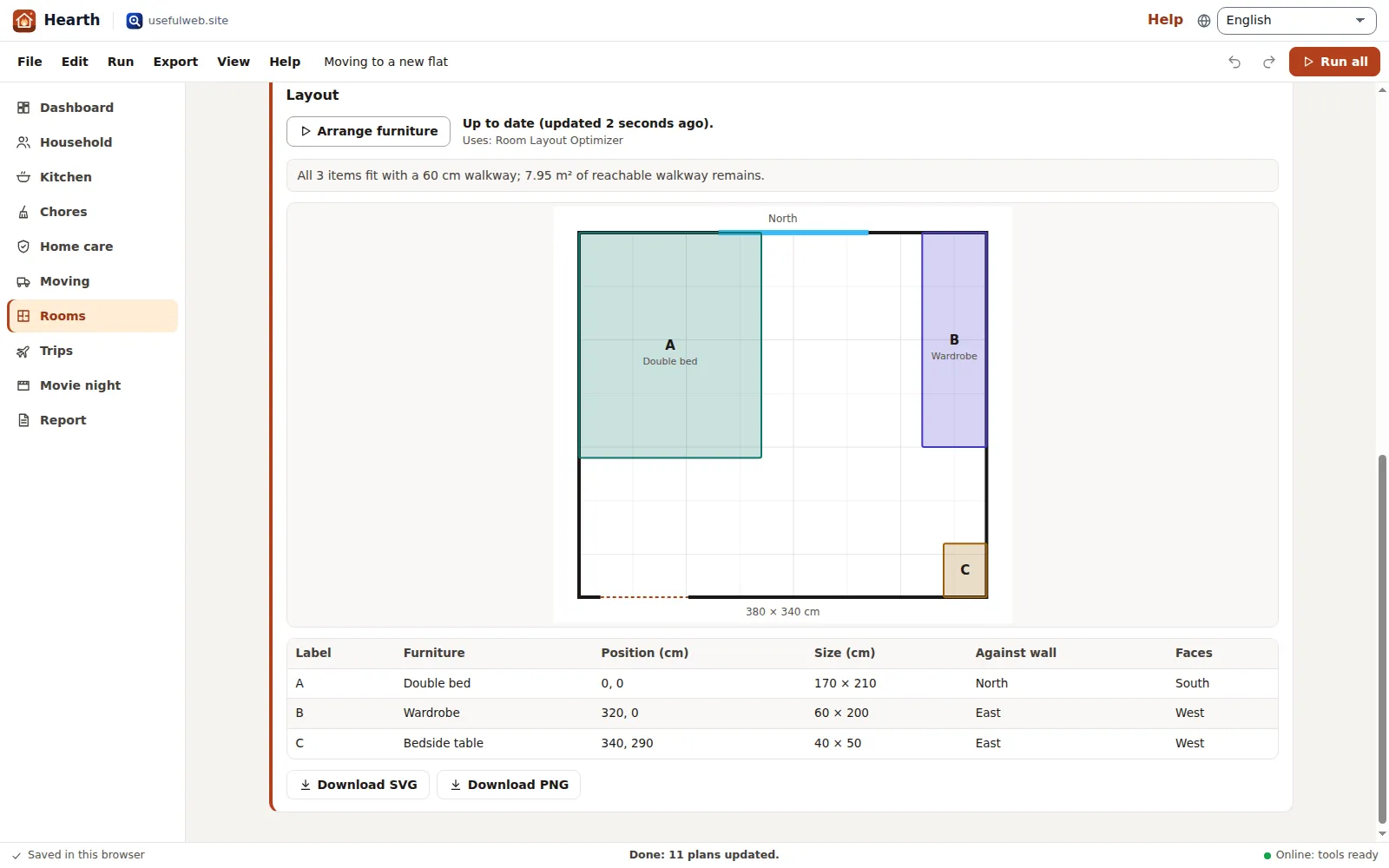 Auto-arranged room layouts
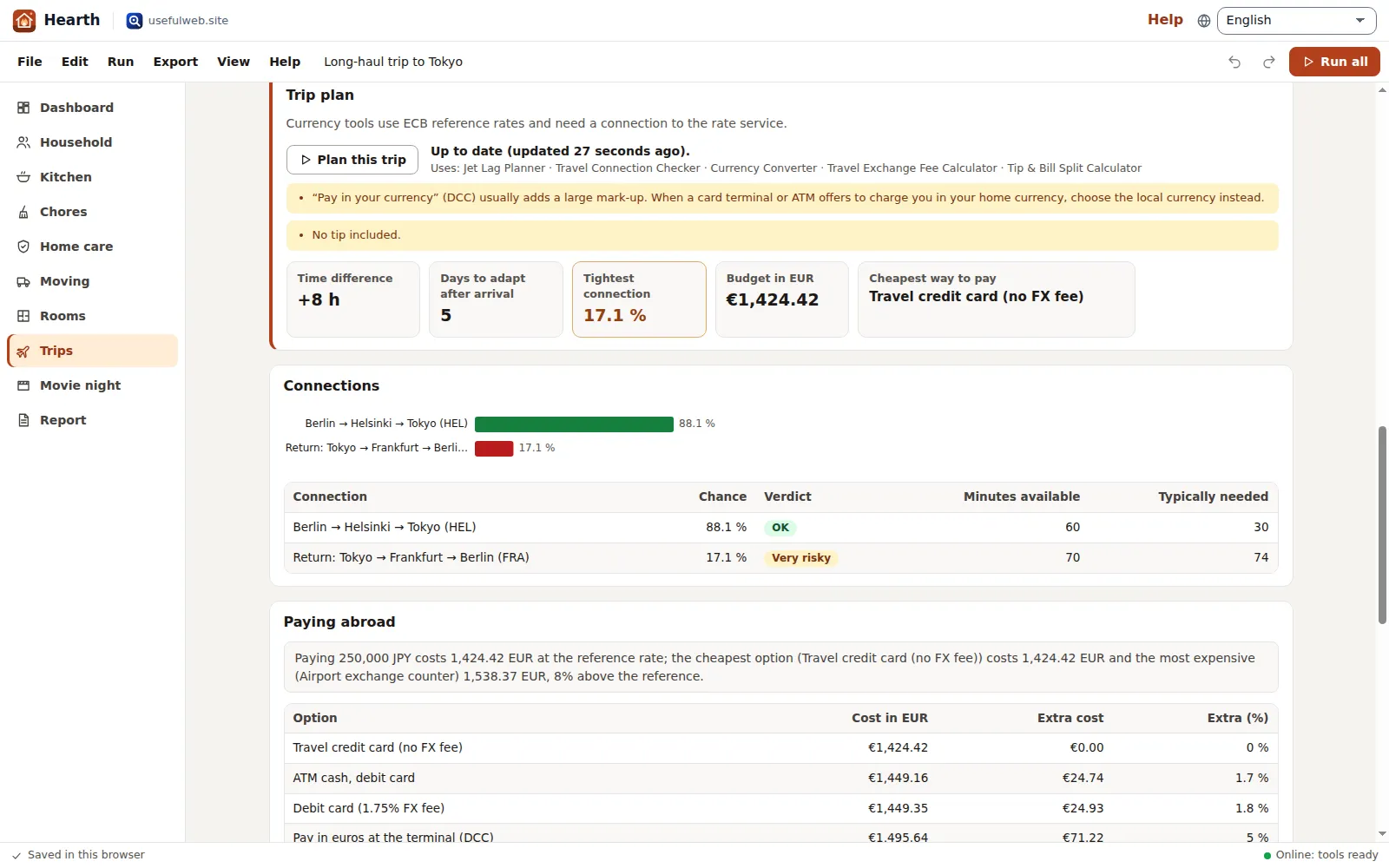 Trip readiness in one view
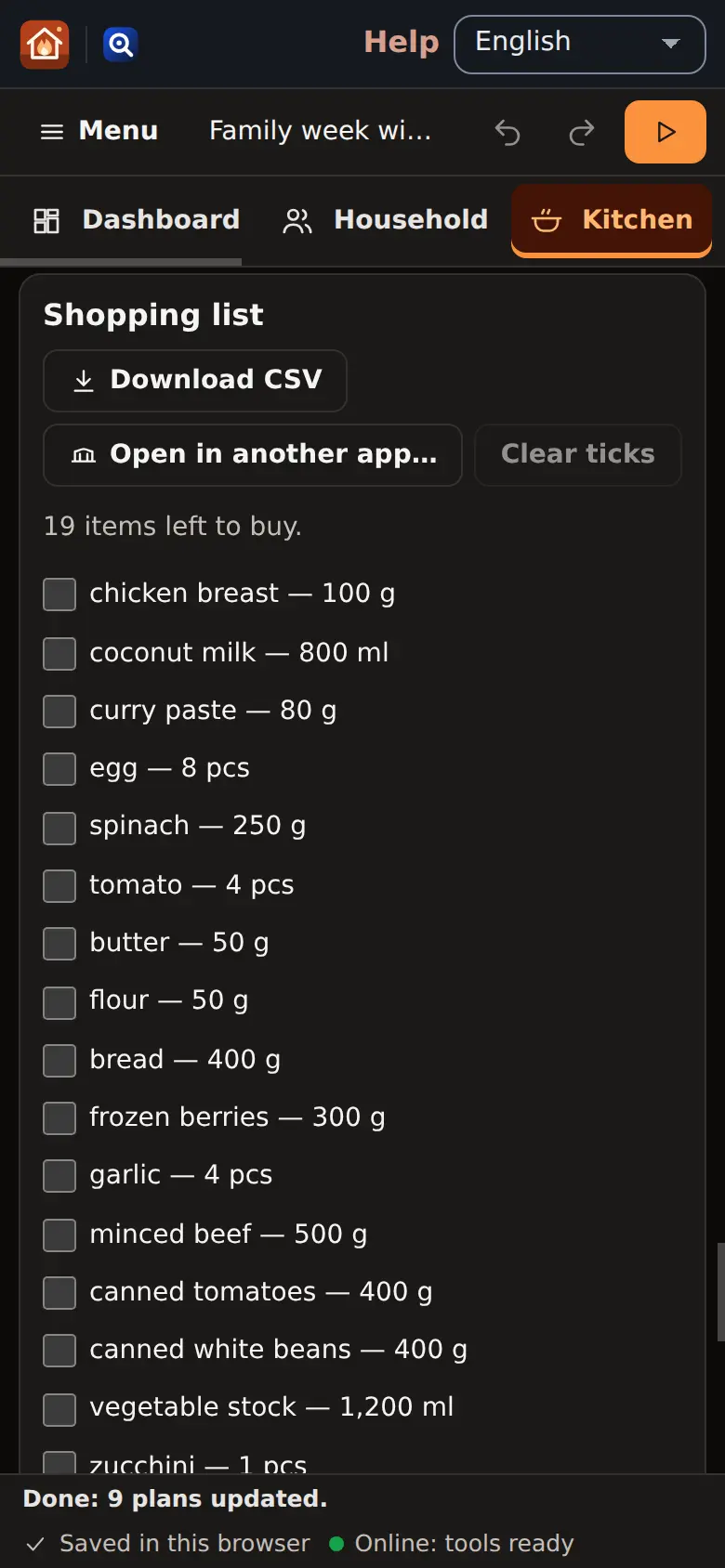 Phone layout and dark theme
Features
One household, every plan
Enter people, currency, home type and features once. The chore tools, the emergency kit, the moving crew and the maintenance calendar all read the same household.
Fridge to shopping list
A storage check of your leftovers and frozen food, recipe ideas that use what expires first, a dinner plan for up to 14 days and a merged shopping list you can tick off.
Fair chores over time
A dated rotation by minutes and availability, a weekly roulette that remembers last week, and saved weeks that show who really carried how much effort.
Home care and emergency kit
A maintenance calendar for exactly the appliances you have, plus water, food and supplies for your household from Ready.gov or BBK guidance with a checklist to tick off.
Moving scenarios A/B
Boxes, truck, crew hours, cost and a packing timeline for two scenarios side by side — for example movers versus friends — with the difference in every number.
Batch fit check
Every piece of furniture is checked through the door, hallway corner, stairs and lift in one go. A matrix shows the spare centimetres and which piece fails where.
Room layouts with your photo
Auto-arranged floor plans around a clear walkway, with your own room photo or plan underneath. Copy furniture from the moving list and export SVG or PNG.
Trip readiness
A jet lag plan, the chance of making each connection, five or more ways to pay abroad compared, the budget in your home currency and a fair bill split.
Movie night to marathon
Everyone ranks the films, four voting methods decide, and the winners become a viewing schedule across one or more evenings.
Dashboard and agenda
Findings in plain sentences from every plan, a two-week agenda across chores, maintenance, dinners, the move, sleep plans and movie nights, and the status of every workflow.
One calendar with reminders
Export one .ics file with the events you choose and a reminder before each one, or the calendar files the tools create for rotations, maintenance, jet lag and marathons.
Consolidated report
All findings and key tables in one printable report (save as PDF), as Markdown, or handed to another premium app.
Snapshots over time
Store this week’s key numbers and compare any two snapshots: expiring food, chore fairness, maintenance load, moving cost, tight connections.
Run all, with retry
One click runs every outdated step in the right order with progress, cancel and automatic retry when the server is busy. Typing never waits for the network.
Local-first and offline
Autosave and recent households in your browser, project files, undo and redo, share links and Google Drive. Results are stored with the project, so plans stay readable offline.
App Bridge, API and MCP
Send the shopping list or chore plan as a table and the report as Markdown to other apps; import tables and room photos. Every tool is also available through the JSON API and MCP.


Templates
Start from a ready-made project and change it to fit.
Family week with a dog
Four people, a house with garden and car: pantry and fridge check, dinners for the week, a fair chore rotation, the maintenance calendar, an emergency kit and a family movie vote.
Flat share with chore history
Three flatmates: vegetarian meals from shared groceries, a weekly chore roulette that remembers the last two weeks, and a weekend trip with the bill split three ways.
Moving to a new flat
Six rooms to pack, two moving scenarios (movers vs. friends), seven furniture pieces checked against the doors, corner and stairs, and two room layouts for the new flat.
Long-haul trip to Tokyo
Berlin to Tokyo: a jet lag plan, both tight connections rated, five ways to pay in yen compared, the budget in euros and a restaurant bill split.
Built-in tools
Hearth uses these tools. Each one also has its own page and works on its own, in the browser, through the JSON API and through MCP.
- Weekly Meal PlannerTurn your pantry and its expiry dates into a 7-day dinner plan and a shopping list.
- Leftover ChefTurn leftovers and fridge odds and ends into 5 recipe ideas, using what expires first.
- Food Storage GuideHow long is food safe in the fridge or freezer? Dates from the official FoodSafety.gov chart.
- Household Chore RotatorFair chore rotation by effort and availability, with per-person totals and a calendar.
- Chore RouletteSpin a fair chore rota: random but balanced by effort, with a “not again” rule.
- Household Maintenance CalendarA dated home maintenance schedule for your appliances and features, as a calendar file.
- Disaster Prep BuilderBuild an emergency supply list for your household from official Ready.gov or BBK guidance.
- Moving Box PlannerHow many moving boxes, how much tape, which truck and when to start packing.
- Will It Fit?Check if a sofa, wardrobe or box fits through doors, corners, stairs and lifts.
- Room Layout OptimizerAuto-arrange furniture in a room around doors, windows and a clear walkway.
- Jet Lag PlannerA day-by-day sleep, light and caffeine plan to beat jet lag, with calendar export.
- Travel Connection CheckerEstimate your odds of making a flight connection, step by step.
- Currency ConverterConvert an amount into several currencies at ECB euro reference rates, with rate date and source.
- Travel Exchange Fee CalculatorCompare what cards, ATMs, DCC and exchange bureaus really cost abroad vs the ECB reference rate.
- Tip & Bill Split CalculatorTip, tax and who pays what: split a bill equally, by shares or by items, rounded up.
- Movie Night Consensus PickerEveryone ranks the films, vetoes count: Borda, approval, runoff and Condorcet decide.
- Movie & Series Marathon PlannerPlan a binge: when each movie or episode starts and ends, total days, and a calendar.
For AI agents
Hearth runs on a deterministic engine. The same functions are available as tools with a JSON API and MCP, so scripts and AI agents get exactly the results the app shows.
- Weekly Meal Planner – Turn your pantry and its expiry dates into a 7-day dinner plan and a shopping list.
Tool page ·POST https://hearth.usefulweb.app/api/v1/tools/weekly-meal-planner/calculate· MCPweekly_meal_planner - Leftover Chef – Turn leftovers and fridge odds and ends into 5 recipe ideas, using what expires first.
Tool page ·POST https://hearth.usefulweb.app/api/v1/tools/leftover-chef/calculate· MCPleftover_chef - Food Storage Guide – How long is food safe in the fridge or freezer? Dates from the official FoodSafety.gov chart.
Tool page ·POST https://hearth.usefulweb.app/api/v1/tools/food-storage-guide/calculate· MCPfood_storage_guide - Household Chore Rotator – Fair chore rotation by effort and availability, with per-person totals and a calendar.
Tool page ·POST https://hearth.usefulweb.app/api/v1/tools/household-chore-rotator/calculate· MCPhousehold_chore_rotator - Chore Roulette – Spin a fair chore rota: random but balanced by effort, with a “not again” rule.
Tool page ·POST https://hearth.usefulweb.app/api/v1/tools/chore-roulette/calculate· MCPchore_roulette - Household Maintenance Calendar – A dated home maintenance schedule for your appliances and features, as a calendar file.
Tool page ·POST https://hearth.usefulweb.app/api/v1/tools/household-maintenance-calendar/calculate· MCPhousehold_maintenance_calendar - Disaster Prep Builder – Build an emergency supply list for your household from official Ready.gov or BBK guidance.
Tool page ·POST https://hearth.usefulweb.app/api/v1/tools/disaster-prep-builder/calculate· MCPdisaster_prep_builder - Moving Box Planner – How many moving boxes, how much tape, which truck and when to start packing.
Tool page ·POST https://hearth.usefulweb.app/api/v1/tools/moving-box-planner/calculate· MCPmoving_box_planner - Will It Fit? – Check if a sofa, wardrobe or box fits through doors, corners, stairs and lifts.
Tool page ·POST https://hearth.usefulweb.app/api/v1/tools/will-it-fit/calculate· MCPwill_it_fit - Room Layout Optimizer – Auto-arrange furniture in a room around doors, windows and a clear walkway.
Tool page ·POST https://hearth.usefulweb.app/api/v1/tools/room-layout-optimizer/calculate· MCProom_layout_optimizer - Jet Lag Planner – A day-by-day sleep, light and caffeine plan to beat jet lag, with calendar export.
Tool page ·POST https://hearth.usefulweb.app/api/v1/tools/jet-lag-planner/calculate· MCPjet_lag_planner - Travel Connection Checker – Estimate your odds of making a flight connection, step by step.
Tool page ·POST https://hearth.usefulweb.app/api/v1/tools/travel-connection-checker/calculate· MCPtravel_connection_checker - Currency Converter – Convert an amount into several currencies at ECB euro reference rates, with rate date and source.
Tool page ·POST https://hearth.usefulweb.app/api/v1/tools/currency-converter/calculate· MCPcurrency_converter - Travel Exchange Fee Calculator – Compare what cards, ATMs, DCC and exchange bureaus really cost abroad vs the ECB reference rate.
Tool page ·POST https://hearth.usefulweb.app/api/v1/tools/travel-exchange-fee-calculator/calculate· MCPtravel_exchange_fee_calculator - Tip & Bill Split Calculator – Tip, tax and who pays what: split a bill equally, by shares or by items, rounded up.
Tool page ·POST https://hearth.usefulweb.app/api/v1/tools/tip-bill-split-calculator/calculate· MCPtip_bill_split_calculator - Movie Night Consensus Picker – Everyone ranks the films, vetoes count: Borda, approval, runoff and Condorcet decide.
Tool page ·POST https://hearth.usefulweb.app/api/v1/tools/movie-night-consensus-picker/calculate· MCPmovie_night_consensus_picker - Movie & Series Marathon Planner – Plan a binge: when each movie or episode starts and ends, total days, and a calendar.
Tool page ·POST https://hearth.usefulweb.app/api/v1/tools/runtime-marathon-planner/calculate· MCPruntime_marathon_planner
- MCP endpoint (Streamable HTTP):
https://hearth.usefulweb.app/mcp - Project file format (JSON Schema): https://hearth.usefulweb.app/project.schema.json
- OpenAPI description: /openapi.json · llms.txt · API & MCP
Build a project through the API, then open it in the app with a link to https://hearth.usefulweb.app/app#project=<base64url JSON>.
Import & export
Import
- Hearth project (.hearth.json)
- Tables (CSV/TSV) into pantry, chores, furniture or films
- Room photo or plan (PNG, JPEG, WebP)
- Project link (#project=…)
- App Bridge: tables and images from other apps
Export
- Hearth project (.hearth.json)
- Household calendar (.ics) with reminders
- Tool calendars (.ics): chore rotation, maintenance, jet lag, marathon
- Shopping list, chore plan, pantry and fit check (CSV)
- Report (Markdown and print/PDF)
- Floor plans (SVG and PNG)
- App Bridge: tables and Markdown to other apps
Keyboard shortcuts
| Keys | Action |
|---|---|
| Ctrl + S | Save project file |
| Ctrl + O | Open project file |
| Ctrl + Z | Undo |
| Ctrl + Y | Redo |
| Ctrl + Enter | Run the workflows of this section |
| Ctrl + Shift + Enter | Run all workflows |
| 1 … 9, 0 | Go to a section (Dashboard … Report) |
| R | Run this section |
| ? | Keyboard shortcuts |
| Esc | Close dialog or menu; cancel a running batch |
Frequently asked questions
Is Hearth free, and do I need an account?
Hearth is free and needs no account. Your household is saved in this browser automatically; you can also save it as a .hearth.json file or, when signed in with Google Drive connected, to your Drive.
What is sent to the server?
Only the inputs of the step you run, for example the pantry list when you plan the week. The site tools calculate the result and send it back; Hearth stores it with your project. Your whole household is never uploaded as one file, and room photos never leave the browser.
Does Hearth work offline?
Editing, the dashboard, agenda, report, calendar export and every stored result work offline. Running a tool needs a connection; Hearth tells you when you are offline and keeps your inputs until you run again.
How does the kitchen workflow decide what to cook?
First the Food Storage Guide checks each stored item against the FoodSafety.gov chart. Anything to discard is left out; items that should be eaten soon and pantry items expiring within three days go to Leftover Chef as “use soon”. The Weekly Meal Planner then plans dinners that use what expires first and lists only what you still need to buy.
How do the two chore tools differ?
The Household Chore Rotator plans dated chores for up to 12 weeks by minutes and availability and gives you a calendar file. Chore Roulette spins one week by effort points; Hearth passes last week’s saved assignments to it so nobody gets the same job twice, and the saved weeks show the effort share per person over time.
Can I compare two ways of moving?
Yes. Scenario A and B have their own amount of stuff, distance, stairs and rates. Hearth runs the Moving Box Planner for both and shows boxes, volume, truck trips, crew, hours and cost side by side with the difference.
Where do exchange rates come from?
The Currency Converter and the Travel Exchange Fee Calculator use the European Central Bank’s euro reference rates. Your card issuer’s rate on the day of payment can differ slightly.
Can an AI agent or a script use Hearth?
Yes. The project format is published as a JSON schema at /project.schema.json, and all seventeen tools are available through the JSON API, OpenAPI and MCP on the Hearth host. A script can build a project and open it in the app with a #project= link.
Limitations
What Hearth does not do (yet):
- Hearth plans with the published rules of thumb of each tool; it does not know your actual fridge temperature, your flight’s live status or your mover’s quote.
- Running tools needs an internet connection; the tools are rate limited, so very large batches run with short pauses.
- Recipes come from the tools’ built-in recipe sets; you cannot add your own recipes.
- Room layouts are rectangular rooms with furniture as rectangles; L-shaped rooms, radiators and sloped ceilings are not modelled.
- The fit check treats furniture as a rigid box; it does not model tilting around a corner on stairs beyond what the Will It Fit? tool covers.
- Time zones for jet lag plans are limited to the zones the Jet Lag Planner offers.
- Reminders in the calendar file are suggestions for your calendar app; Hearth itself does not send notifications.
- There is no shared live editing; share a link or a project file instead.
Tutorials
Learn Hearth step by step.
- Your household in ten minutesOpen a template or describe your own household, press Run all, and read the dashboard, the two-week agenda and the findings. No account, nothing to install.Beginner 10 min
- From the fridge to the shopping listCheck leftovers against the FoodSafety.gov chart, get recipe ideas that use what expires first, plan the week’s dinners and tick off a merged shopping list.Beginner 8 min
- Fair chores over timePlan a dated rotation by minutes and availability, spin a weekly roulette that remembers last week, save weeks and see who really carried how much.Intermediate 8 min
- Moving scenarios and the furniture fit checkCompare two ways of moving side by side, check every piece of furniture against the door, corner, stairs and lift, and arrange the new rooms.Intermediate 12 min
- Trip readiness: jet lag, connections and moneyPlan sleep and light for a long-haul trip, rate every tight connection, compare what each way of paying abroad costs and split a restaurant bill.Intermediate 10 min
- One calendar, a report and snapshotsExport one calendar file with reminders, print or share a consolidated household report, and compare snapshots of your key numbers over time.Advanced 7 min
Ready to try it?
Other premium apps
-

Kerfwise
Cabinet & furniture CAD
Design cabinets and furniture, get cut lists, optimised sheet layouts, costs and drawings.
-

Kinetica
Robot motion studio
Simulate robot arms in your browser: kinematics, trajectories, collisions, program export.
-

Threadsmith
Embroidery digitizing studio
Draw or import artwork, turn it into stitches, export DST, PES, JEF or EXP files.
-

Ohmforge
Virtual electronics workbench
Draw a circuit, switch it on, and measure it with real-feeling bench instruments.
-

Twinworks
Factory digital twin & production simulation
Model a production line, simulate it and find the bottleneck — free, in your browser.
-

Agentlab
AI-agent & LLM workbench
Test an AI agent before release: permissions, traces, costs, citations and output checks.
-

Bundlekeep
Local project backup
Back up projects from every usefulweb app into one file, check it and restore any part.
-

Chainscope
Web3 investigation desk
Investigate transactions, bridges, contracts, DAOs and wallets in one case file.
-

Chartroom
Data & charts studio
Import data, chart it, run analyses and publish a report — one workspace, free.
-

Fieldday
Sports club & training organiser
Fixtures, brackets, ratings and training plans for your club — in one workspace.
-

Flipline
Drawing, storyboards & animation
A few drawings. A little life. Make a flipbook in your browser.
-

Keysmith
Crypto & secrets lab
Audit certificates, keys, TLS and passwords in one lab; secrets stay on your device.
-

Ledgerly
Household finance & life-admin desk
Budgets, bills, subscriptions, loans, contracts and deadlines on one private desk.
-

Lumina
Photo editor & image toolkit
Bring out what you saw. A free photo studio, right in your browser.
-

OBSCURIQ
OSINT case desk
Organize public-source research: cases, a research log, pivots and indicators.
-

Opsdeck
Developer & ops workbench
One deck for CI failures, cron, traces, k8s events, API diffs, query plans and Terraform.
-

Pageboard
Website inspiration boards
Collect website references, sort them with tags and arrange them on a moodboard.
-

Panelcraft
Comic books & figure references
Shape a page. Arrange a book. Give your story a voice.
-

Paperwell
Document studio: PDFs, OCR, redaction, forms & contract reading
Your paperwork in one dossier: PDF tools, OCR, redaction, forms and contract reading.
-

Proofline
Math notebook
Solve, graph, test and visualise in one notebook — with data, findings and a report.
-

Provenance
Software supply-chain security desk
SBOMs, CVEs, containers and licences in one risk register — free, in your browser.
-

RavingDesk
Paper trading workspace
Practise trading on paper: orders, ledger, risk, exposure and journal. No real money.
-

Reelcraft
Audio, video & image batch studio
Audio, video & image batch studio: cut, convert, compress, subtitle, reframe
-

Renderloom
3D scene & material studio
Shape a scene. Find its light. Keep every idea editable.
-

Signalhouse
Website & internet infrastructure inspector
Inspect DNS, TLS, mail, CDN and routing of all your domains — and see what changed.
-

Tonegrid
Tone matrix & beat sequencer
Light up squares to build looping melodies and beats, then arrange them into songs.